If you are adding WhatsApp chat to your website, the goal is not just to make the button visible. The real goal is to make it feel like a natural part of the site, not some random add-on bolted onto the corner of the screen.
That is why so many site owners search for a customizable WhatsApp widget for website use instead of settling for a plain link or a generic floating button. A simple click-to-chat shortcut can work, sure. But when the widget matches your brand, fits your layout, and shows up at the right time, it feels much more intentional.
For beginners, this matters more than it may seem. A widget that looks off-brand, appears too aggressively, or covers important UI can hurt the user experience. A widget that feels clean, on-brand, and well placed can make it easier for visitors to start a conversation without friction.
What does “customizable” actually mean in a WhatsApp widget?
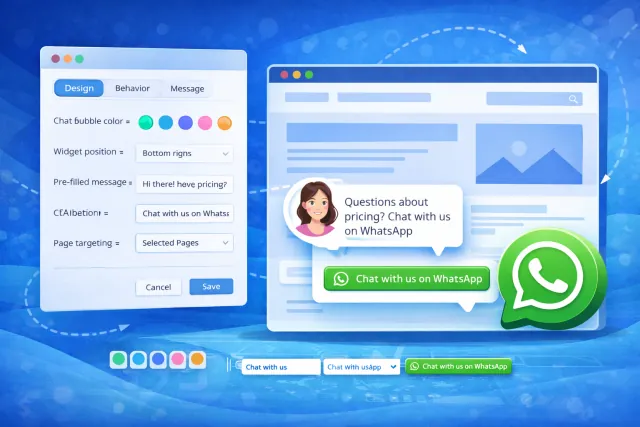
In practice, a customizable WhatsApp widget gives you control over the things that shape how the widget looks and behaves on the page.
That usually includes:
- the visual style of the chat bubble or launcher;
- the welcome text and call to action;
- pre-filled messages;
- the widget position on the screen;
- timing and display behavior;
- where the widget appears across your website.
That is the difference between a basic “here is our number” approach and a widget that actually supports your conversion path.
And this is exactly where WApp Chat makes sense as a focused option. It is very customizable in the way most website owners actually need: you can shape the design, tune the message, and adjust the behavior so the widget feels aligned with your site instead of looking generic.
Before going deeper, this is the best spot to let readers try the live builder themselves.
Why customization matters more than most beginners expect
A lot of people think any WhatsApp bubble will do the job. Sometimes it will. But if you care about UX, brand perception, and lead quality, customization is not just a nice extra.
It matters because the widget sits on top of your interface. It is always visible, often fixed, and usually one of the first interactive elements a visitor notices. If that element looks awkward, feels too pushy, or clashes with the rest of the page, users notice that too.
A good widget should feel native. It should look like it belongs there.
That means:
- matching your visual identity instead of screaming “third-party plugin”;
- using welcome text that sounds like your brand voice;
- appearing on the right pages instead of sitewide by default;
- showing up at the right moment instead of interrupting users immediately.
In other words, the more control you have, the easier it is to avoid the usual rookie mistakes.
Why not just use a plain WhatsApp link?
You can absolutely use a plain wa.me link. It is quick, simple, and better than nothing. But it is also limited.
A raw link does not give you much control over visibility, placement, or how the contact option fits into your page design. It does not help much with branding. It does not feel like a polished UX element. And it is easy for visitors to miss.
A proper widget gives you more than a shortcut. It gives you a cleaner CTA, better visibility, and more room to make the chat entry point feel intentional.
That is a big reason why webmasters, growth folks, and small business owners usually move from a simple link to a widget once they start thinking seriously about conversions.
What should you customize first?
If you are building your first WhatsApp widget, do not get lost in endless tweaking. Start with the elements that actually affect usability.
1. The welcome text
This is the first thing users read. Keep it clear, friendly, and specific. A generic “Hi there” is fine, but something like “Questions about pricing? Chat with us on WhatsApp” often feels more relevant.
2. The CTA copy
Your button text should be easy to understand at a glance. “Chat with us on WhatsApp” usually works better than vague wording.
3. The visual style
Adjust the widget so it feels on-brand. This is where color, layout feel, and overall polish matter. The last thing you want is a widget that looks like it belongs to another site.
4. The trigger and timing
Showing the widget instantly is not always the best play. On many pages, a short delay feels more natural and less intrusive.
5. Page targeting
You do not need the widget everywhere. For many sites, it performs best on high-intent pages like pricing, product, service, or contact pages.
Why WApp Chat is a practical fit for this use case
If your main goal is a customizable WhatsApp widget for website use, WApp Chat fits well because it stays focused on what most site owners actually need.
It is not trying to be a giant all-in-one support suite. It is a simpler, cleaner way to launch WhatsApp chat on your site and shape the experience around your brand.
That makes it especially useful if you want to:
- launch quickly without custom coding;
- adjust the widget without touching the site again and again;
- fine-tune the design and message;
- control where the widget appears;
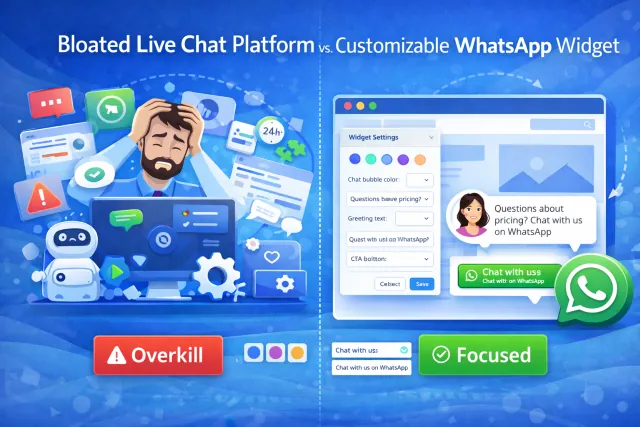
- avoid a bloated live chat setup.
For a lot of beginner webmasters, that is the sweet spot. Not too bare-bones, not overengineered.
How customization can help conversions
A widget does not improve conversions just because it exists. It helps when it removes friction at the right point in the journey.
Think about a typical visitor:
- they land on your pricing page and have one quick objection;
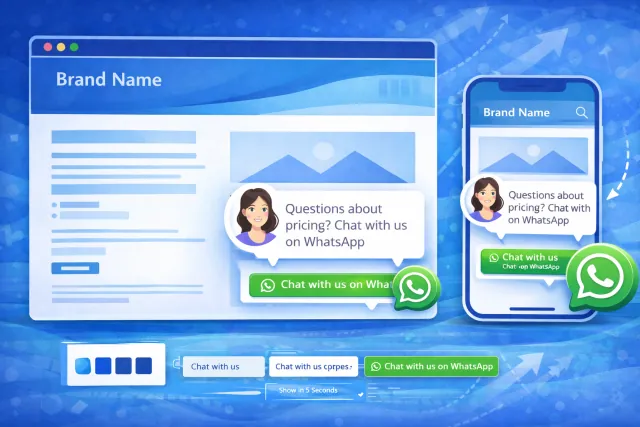
- they are browsing on mobile and do not want to fill out a long form;
- they are comparing vendors and want a fast answer before bouncing;
- they need reassurance, not a support ticket workflow.
That is where a well-configured WhatsApp widget can punch above its weight.
And customization plays a real role here. A clearer CTA, a better-timed appearance, a more relevant message, and smarter page targeting can all make the widget feel more useful and less noisy. That can improve both engagement and the overall conversion path.
This is also why a super complex live chat platform can be overkill for many websites. If what you really need is a clean, brand-matched WhatsApp entry point, a simpler widget often gets you there faster.
Best places to show a customizable WhatsApp widget
One of the easiest wins is being selective.
Instead of dropping the widget on every page by default, start with pages where the intent is already strong:
- pricing pages;
- service detail pages;
- product pages;
- booking pages;
- contact pages;
- high-performing landing pages.
This keeps the UX cleaner and makes the widget feel more contextual. It also helps you avoid wasting attention on low-value pages where users are not ready to reach out yet.
If your traffic is mixed, this kind of targeting is often a smarter move than sitewide placement.
Common mistakes to avoid
Even a good widget can underperform when the setup is sloppy. Here are the mistakes that come up again and again:
- using default text that says nothing useful;
- making the widget too loud visually;
- showing it instantly on every page;
- placing it where it overlaps with cookie banners or sticky buttons;
- forgetting to test on mobile;
- treating customization like decoration instead of UX.
The goal is not to make the widget flashy. The goal is to make it frictionless.
Who benefits most from a customizable WhatsApp widget?
This setup tends to work especially well for:
- small business websites;
- service businesses;
- freelancers and consultants;
- landing pages with a direct-response angle;
- ecommerce stores that need quick pre-sale answers;
- webmasters who want a no-code, plug-and-play contact channel.
If your audience often has one or two quick questions before taking action, WhatsApp can be a much better fit than a traditional contact form.
Final thoughts
If you are looking for a customizable WhatsApp widget for website use, do not focus only on whether the widget “works.” Focus on whether it fits your site.
That is what makes customization valuable. It helps the widget match your branding, support your UX, appear on the right pages, and feel like a natural part of the journey instead of a random plugin stuck in the corner.
WApp Chat is a strong fit for this because it keeps the process simple while giving you the controls that actually matter: design, messaging, behavior, and placement. For beginners, that is usually the best combo — enough flexibility to shape the experience, without the dashboard bloat of a full live chat platform.
For many websites, that is all you really need: a clean chat entry point, a better conversion path, and a widget that feels like your brand from the first click.
Frequently Asked Questions
What is the best customizable WhatsApp widget for a website?
The best option is usually the one that gives you enough control over design, text, timing, and placement without becoming overly complicated to set up or manage.
Can I customize a WhatsApp widget without coding?
Yes. Many modern widgets are no-code and let you adjust the design, message, and behavior through a visual editor.
Should I show the widget on every page?
Not always. For many websites, it works better on high-intent pages such as pricing, product, service, and contact pages.
Is a customizable widget better than a plain WhatsApp link?
Usually yes, because it gives you better visibility, stronger branding, and more control over how the contact CTA fits into your page experience.