Our widget is an interactive element that is displayed on your website and allows visitors to instantly start a conversation in WhatsApp
Before you begin, make sure you've created your widget and copied the installation code from your WApp Chat dashboard
Step-by-step guide for getting the code of the Wapp Chat widget
Install to the single page
1. You receive the installation code. This is a small piece of code that consists of two parts: a container div and a script.
2. You paste this code into your page like a regular HTML element.
3. When a visitor visits the page, the script is automatically activated. He finds the same container div on the page.
4. The script creates the iframe element itself.
5. Already inside this newly created iframe, the widget itself is drawn.
This approach ensures that the widget will work stably and will not conflict with the CSS styles or JavaScript code of your site, as the iframe creates an isolated space.
Step-by-step installation instructions. The installation process is extremely simple and will take you no more than a minute.
The main technical feature that is important to understand is that the widget is always created and works inside its own iframe. The installation and operation process looks like this:
Log in to your personal account on our website and go to the widget management section. There you will find your unique embed code.
Step 1. Get the widget code.
Select and copy the entire code.
Step 2. Copy the code.
Open the HTML code editor of the page where you want to see the widget. Paste the copied code before the closing body tag. This is the optimal location that ensures that the script loads after the main content of the page and does not slow down its display.
Step 3. Paste the code on your website.
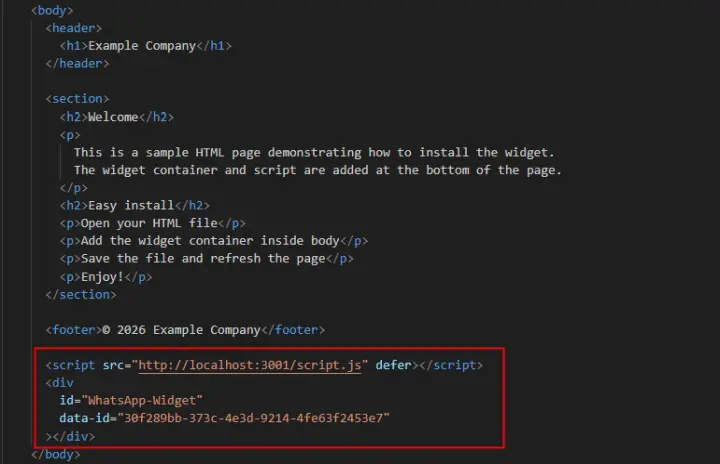
You're All Set 🎉
If you use a popular CMS (for example, WordPress, Joomla, OpenCart), you can insert the code into a special section for counters and scripts in the theme settings or using plugins to insert HTML code.
You can customize the widget's appearance, position, and behavior anytime in your WApp Chat dashboard.
Need help with setup? Our support team will gladly assist you.
support@wapp-chat-widget.com