Improve your WordPress site. Add a WhatsApp chat button with the WApp chat widget. If you're using the Elementor page builder, the process is quick and straightforward. This guide will show you exactly how to add the widget to any page.
Before you begin, make sure you've created your widget and copied the installation code from your WApp Chat dashboard
Step-by-step guide for getting the code of the Wapp Chat widget
Install to the single page
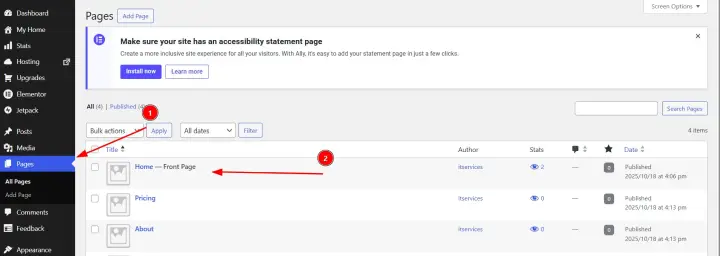
Log in to the admin area of your WordPress website. In the left-hand menu, go to Pages and find the page where you want the WhatsApp button to appear (e.g., Contact Us, Homepage). Click on the page title to open it in the standard editor, but don't edit here-just proceed to the next step.
Step 1: Select the Page in WordPress
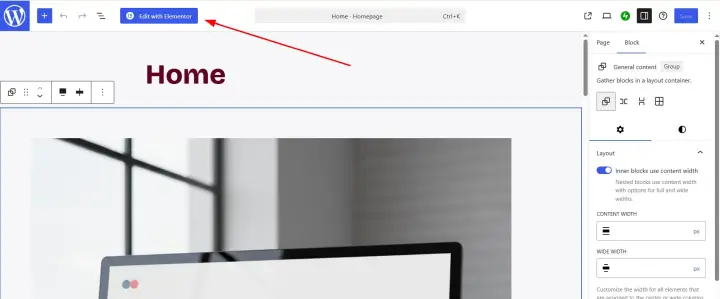
To start building with Elementor, click the Edit with Elementor button. This will launch the Elementor editor for your selected page.
Step 2: Open the Page with Elementor
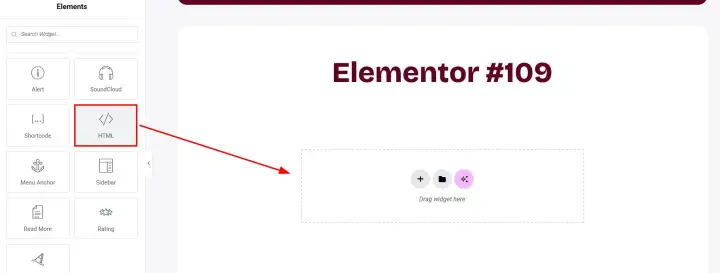
In the Elementor editor panel on the left, you'll see a list of widgets. Scroll down or search for the HTML widget.
Once you've found the HTML widget, click and drag it from the panel onto the desired section of your page preview.
Step 3: Locate and Add the HTML Element
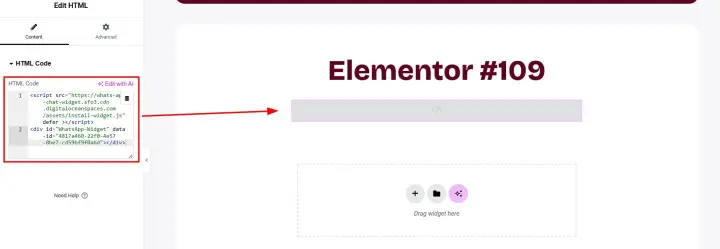
After dropping the HTML widget onto your page, its settings will appear in the left panel. You will see a field labeled HTML Code. Simply paste your WApp Chat installation code into this box.
Step 4: Paste Your WApp Chat Installation Code
Click the Publish or Update button at the of the Elementor panel to make your changes live on your website.
That's it! You have successfully added the WApp Chat Widget to your WordPress page using Elementor. Your visitors can now contact you with a single click.
Step 5: Save and Publish Your Page
That's it! 🎉
You have successfully added the WApp Chat Widget to your WordPress page using Elementor. Your visitors can now contact you with a single click.
Need a Hand? If you encounter any issues during installation or have questions about customizing your widget, our support team is here to help. Please reach out to us.
support@wapp-chat-widget.com