Adding a WhatsApp chat widget to your HTML website takes only a few minutes. Once installed, visitors can contact you instantly via WhatsApp from any page of your site.
Before you begin, make sure you've created your widget and copied the installation code from your WApp Chat dashboard
Step-by-step guide for getting the code of the Wapp Chat widget
Install to the single page
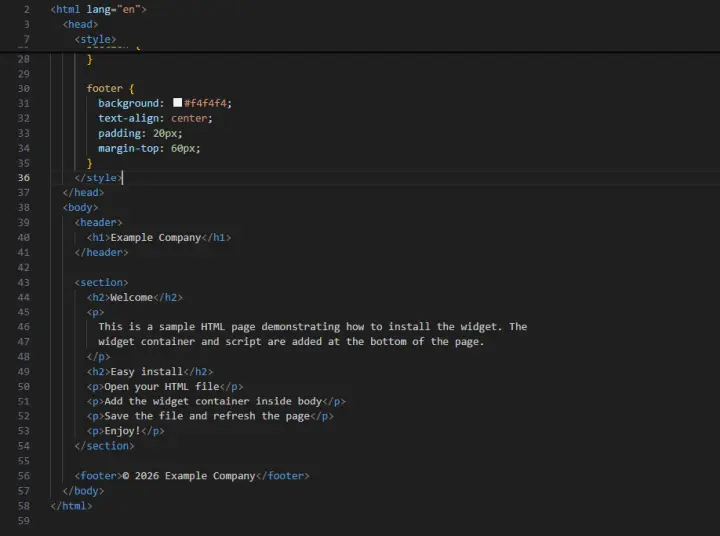
Open the HTML file where you want the widget to appear (for example: index.html)
Step 1: Open your HTML file
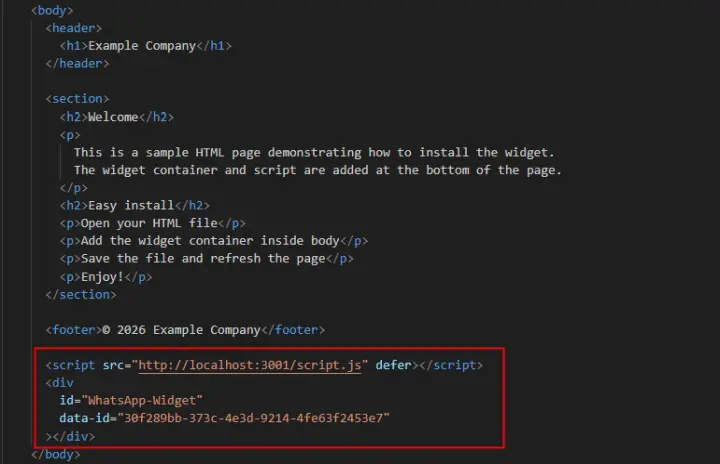
Place the widget code inside the <body> tag
Usually it is added before the closing </body> tag
Step 2: Add the widget container inside '<body>'
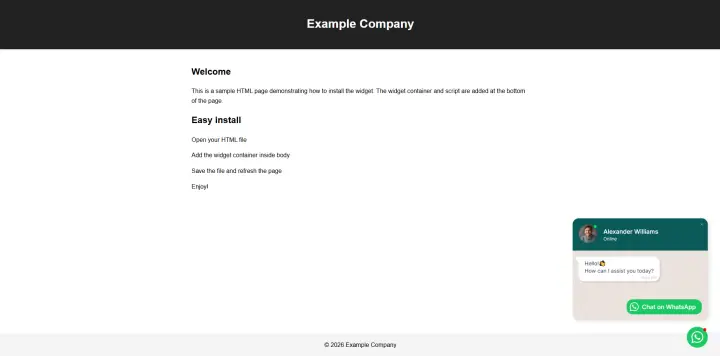
After saving the file, refresh your website in the browser
The widget should now appear on the page
Step 3: Save the file and refresh the page
The widget must be placed inside the <body> tag
It is recommended to place it before the closing </body> tag
If your website has multiple pages, repeat the same installation steps on each page
Make sure the widget code is correct
Important Notes
You're All Set 🎉
Your WhatsApp chat widget is now live on your Wix website. Visitors can contact you instantly - from desktop or mobile.
You can update the widget's design, behavior, or message anytime in your WApp Chat dashboard.
Need help? Our support team is always happy to assist.
support@wapp-chat-widget.com