Want to add a WhatsApp chat widget to your Weebly website, but don't know where to start? In this step-by-step guide, you will learn about the entire installation process of the Wapp chat widget. Just copy the installation code of your widget and let's get started! 🚀
Before you begin, make sure you've created your widget and copied the installation code from your WApp Chat dashboard
Step-by-step guide for getting the code of the Wapp Chat widget
Choose How You Want to Display the Widget
Install to the single page
Log in to your Weebly account, select the website you want to add the widget to, and click Edit Website.
Step 1: Log in and edit the website

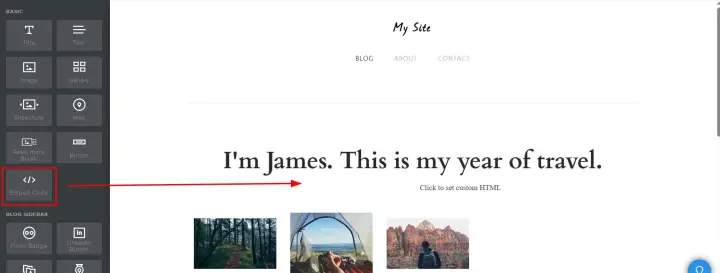
Drag the embed code element to the menu on the left.
Step 2: Add an embed code element
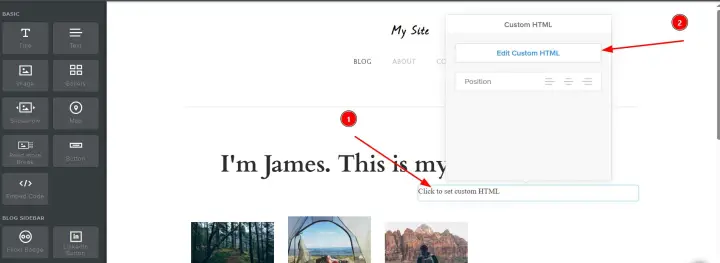
Hover over the new element and click Customize Custom HTML to open the popup menu.
Step 3: Open the window to enter the code
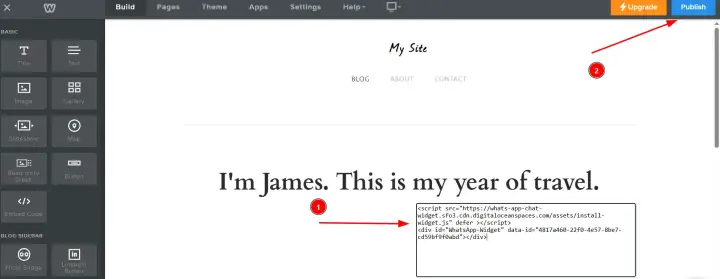
Paste the code to install your Wapp chat widget in this field. The code will be applied automatically when you click outside the field.
Click the blue publish button in the upper-right corner to make changes.
Step 4: Add your code
Install to the All pages
Use this method to place the WhatsApp chat widget on every page of your website.
Log in to your Weebly account, select the website you want to add the widget to, and click Edit Website.
Step 1: Log in and edit the website

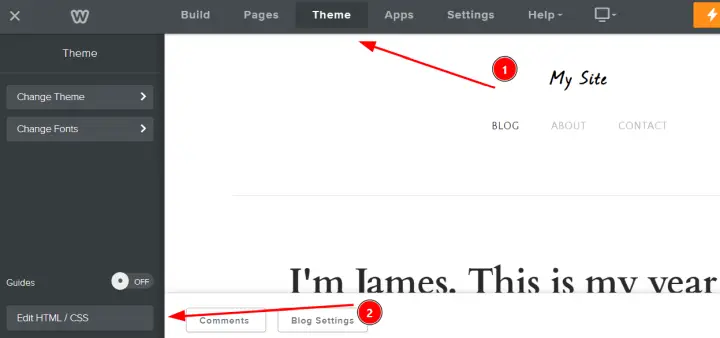
Select Theme from the top navigation bar, then click Edit HTML/CSS at the bottom of the left menu.
Step 2: Open the theme editor
In the list of files, click on header.html to open it. Paste the installation code of your widget immediately after the opening
tag.
Step 3: Edit header.html

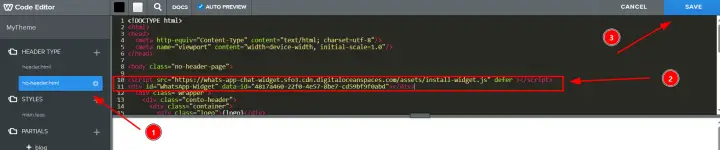
Open the file no-header.html (used for pages such as landing pages). Add the same installation code after the
tag here.Click the Save button in the upper-right corner of the code editor.
Step 4: Edit no-header.html
Go back to the main website builder and click the blue publish button in the upper-right corner to apply the changes.
Step 5: Publish

Great! You have successfully added the Wapp chat widget to all the pages of your Weebly website.
Need a Hand?
If you encounter any issues during installation or have questions about customizing your widget, our support team is here to help. Please reach out to us.
support@wapp-chat-widget.com