A lot of small business websites still make the same mistake: they ask visitors to fill out a contact form, wait for a reply, and hope the lead does not bounce in the meantime. In real life, that is not how people want to communicate anymore. They want a fast answer, on a familiar channel, without extra steps.
That is exactly why adding a WhatsApp widget for a small business website makes sense. A good widget removes friction, shortens the path from visit to message, and gives potential customers a way to reach you while their intent is still warm. Instead of sending people to a clunky contact page, you give them a quick click-to-chat option right where the buying decision happens.
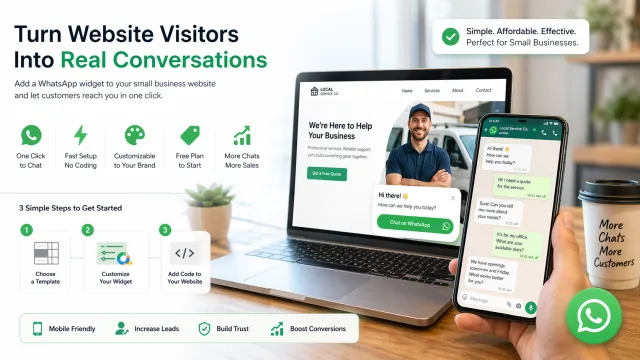
For lean teams, local businesses, solo founders, agencies, coaches, and small ecommerce brands, this matters even more. You do not always have a sales rep sitting in a dashboard all day. You need something lightweight, easy to launch, and simple to manage without dragging a developer into the process.
That is where WApp Chat fits in especially well. It is built for businesses that want a no-code WhatsApp chat widget without the usual setup drama. You can create the widget, tweak the look, copy the code, and go live fast. The platform is also positioned as a very budget-friendly option for smaller teams: there is a free plan to start with, and if your traffic grows, you can move to one of the paid tiers without changing your whole setup.
Try a Simple WhatsApp Widget Built for Small Businesses
If your goal is to get a working WhatsApp website widget live with minimal lift, this is the point in the page where users should be able to test the builder and see how quickly the setup works.
For many small businesses, that is the real selling point. You are not shopping for a giant customer support suite. You are trying to add a clean floating WhatsApp button, make it match your branding, set a welcome message, and start capturing conversations. That is it. No heavy onboarding. No tech headache. No bloated tool stack.
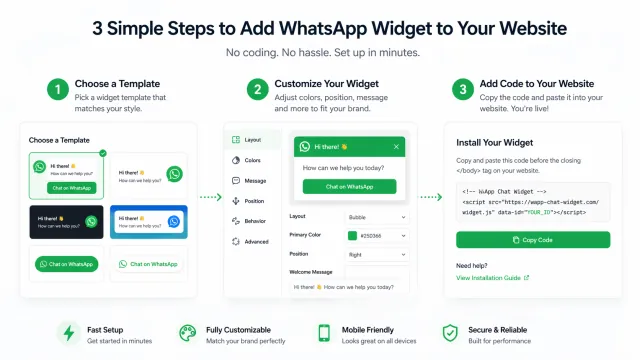
WApp Chat is a strong fit here because it keeps the workflow straightforward:
- pick a template,
- customize the widget,
- paste the code into your site,
- start chatting with customers.
And because pricing matters when every software bill hits your margin, the entry point is friendly. Many smaller websites can get meaningful value from the free tier alone. If you are getting more traffic, more pageviews, or more inbound messages, you can scale up with a paid plan instead of replacing the tool later.
Why a WhatsApp Widget Works So Well for Small Business Websites
Small businesses win by being fast, personal, and easy to reach. A WhatsApp chat widget supports all three.
First, it reduces response friction. A visitor who has a quick question about pricing, availability, delivery, booking, or custom work does not want to dig through a footer, copy an email address, and wait. A click-to-chat CTA feels immediate and can save warm leads from dropping off.
Second, it feels familiar. People already use WhatsApp in their everyday life, so the interaction feels low-effort. There is no learning curve, no account creation, and no weird handoff into a clumsy chat flow. On mobile, that matters a lot.
Third, it helps smaller teams stay scrappy. You do not need to overengineer your support flow. For many businesses, a simple WhatsApp button on the site is enough to handle pre-sale questions, appointment requests, quote requests, and post-sale check-ins from one recognizable channel.
It is a low-lift conversion assist. Not flashy. Just effective.
What Small Businesses Should Actually Look For in a WhatsApp Widget
Not every widget is worth installing. Some look dated. Some are a pain to configure. Some are priced like enterprise software even though the feature set is basic.
A practical WhatsApp widget for a small business website should check a few boxes:
1. No-code setup
If it takes a support ticket, a plugin maze, or custom dev time just to launch, it is already too expensive for a lot of small teams.
2. Fast customization
You should be able to adjust colors, button style, text, and placement without wrestling with CSS or editing theme files.
3. Mobile-friendly behavior
A big share of small business traffic comes from mobile. The widget should feel native on phones, not cover the whole screen or fight with the site layout.
4. Clear value at the free tier
A free plan should be useful enough to test the channel in a real-world setting, not just a throwaway demo.
5. Upgrade paths for higher traffic
When more visitors hit the site, you should be able to move to a paid plan without rebuilding your widget from scratch.
That is why WApp Chat makes sense for smaller operators. The product messaging is centered on zero coding, fast setup, customizable design, and a free plan with premium options available when needed. That is the kind of practical stack small businesses usually want: simple, flexible, and not overcooked.
Best Use Cases for a WhatsApp Widget on a Small Business Website
Local service businesses
Plumbers, electricians, cleaners, roofers, tutors, salons, med spas, repair shops, and similar businesses often lose leads because the next step feels too slow. A WhatsApp button lets visitors ask, "Are you available this week?" or "Can I get a quote?" in seconds.
Small ecommerce brands
Buyers have last-minute questions. Shipping. Sizing. Custom options. Returns. Stock. A quick chat touchpoint can keep them from bouncing at the product page or checkout stage.
Freelancers and solo consultants
When you are a one-person operation, you need a contact channel that feels personal without forcing people into a long intake form. WhatsApp keeps the first touch casual and direct.
Agencies and web professionals
If you build sites for clients, adding a lightweight click-to-chat widget is a fast win. It improves UX, looks useful on a sales call, and usually takes less effort than rolling out a full chat platform.
Coaches, creators, and appointment-based businesses
If your business runs on trust, quick access matters. A WhatsApp widget gives prospects a direct line for basic questions before they book.
Why WApp Chat Is a Good Match for Smaller Teams
A lot of tools promise "easy setup," but for a small business owner that phrase only matters if it is actually true at 11 PM on a Tuesday when nobody is around to help. WApp Chat leans into that real-world use case.
The setup is designed to be dead simple. The website highlights zero coding, a copy-and-paste install flow, customizable templates, and a three-step launch process. That is exactly the type of low-friction rollout most small businesses need.
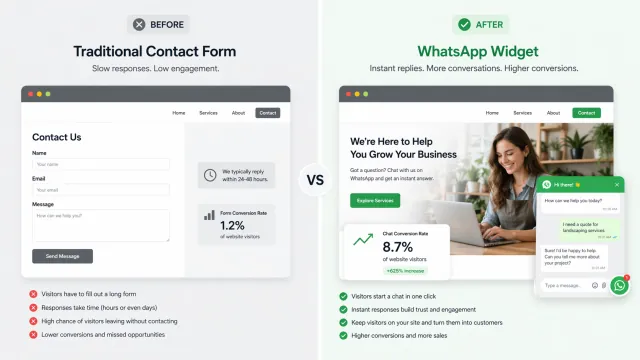
It also hits an important pricing sweet spot. Smaller sites usually do not want to commit to a big monthly bill just to test whether onsite chat will move the needle. Starting free makes sense. Then, if the widget proves itself and the site gets more traffic, a paid plan becomes an operational upgrade, not a gamble.
There is also a branding angle here. Small businesses do not want a generic button that looks bolted onto the page. They want something that feels native to the site. A widget that can be styled to fit the brand will always outperform one that looks out of place or spammy.
Put simply: WApp Chat feels like a practical tool for businesses that want more conversations without adding more complexity.
How to Add a WhatsApp Widget to a Small Business Website
The setup is usually straightforward:
- Choose a widget template that matches your site style.
- Add your business phone number and a clear welcome message.
- Adjust the look and placement so it feels natural on the page.
- Copy the installation code.
- Paste it into your website or site builder.
- Test the widget on desktop and mobile.
That is the whole playbook. No long rollout. No deep integration project. Just a simple conversion layer that helps visitors reach you faster.
A smart welcome message also helps. Keep it short and natural. Something like:
- "Hi there - have a question before you book?"
- "Need a quick quote? Message us on WhatsApp."
- "Looking for availability today? Start a chat."
This kind of copy feels human, not robotic, and usually gets better engagement than stiff corporate text.
Final Take: The Best WhatsApp Widget for a Small Business Website Is the One You Will Actually Use
For a small business, the best WhatsApp widget is not the one with the longest feature list. It is the one that is easy to launch, easy to manage, affordable to keep, and effective enough to generate more conversations from the traffic you already have.
That is why WApp Chat makes a compelling option. It removes the usual setup friction, fits the no-code reality of smaller teams, gives new users a free way to start, and leaves room to upgrade when traffic grows. For businesses that want a clean plug-and-play WhatsApp website widget instead of a bulky support stack, that is a smart place to start.
If your website gets visitors but not enough inquiries, adding a WhatsApp widget for your small business website can be one of the simplest CRO moves you make this year. Keep it visible. Keep it easy. Keep the first message one click away.