WhatsApp Widget Generator for Websites That Need More Conversations
A WhatsApp widget generator helps you create a clickable chat widget for your website without writing code from scratch. Instead of sending visitors to a plain contact page or asking them to copy your phone number, you give them a fast, familiar way to start a conversation directly from your site.
For many businesses, that small floating WhatsApp button in the corner of the screen becomes one of the most useful conversion points on the page. It works for product questions, service inquiries, booking requests, quote requests, post-purchase support, lead qualification, and quick "before I buy" conversations.
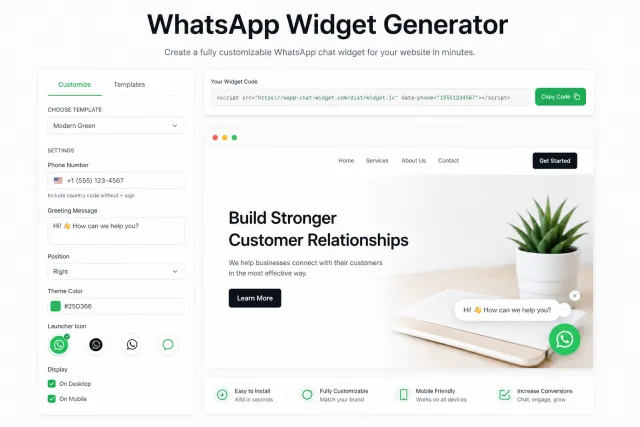
The idea is simple: a visitor lands on your website, sees a branded WhatsApp chat bubble, clicks it, and opens a conversation with your business. But the execution matters. A generic green button is not always enough. Your widget should match your site design, your tone of voice, your offer, and the way your customers actually ask questions.
That is where Wapp Chat Widget comes in.
With Wapp Chat Widget, you can generate different variations of a WhatsApp widget, start from ready-made templates, or build a fully custom design that fits your website almost pixel-perfect. You can adjust the visual style, message, position, button behavior, colors, shape, text, and other key elements without touching the code manually.
Create Your WhatsApp Widget Here
The user has already understood the problem: they need a fast way to add WhatsApp chat to a website. Now they are ready to build the widget.
Inside the generator, they should be able to choose a ready-made WhatsApp widget template, add their WhatsApp or WhatsApp Business number, customize the welcome message, change the widget position, edit the button text and CTA, adjust colors, radius, spacing, and layout, preview the widget before installation, and copy the generated installation code.
The main value is flexibility. Some users want a clean plug-and-play template. Others want the widget to blend into a premium brand website, SaaS landing page, real estate page, local service website, or Shopify-style product store. A good generator should support both.
What Is a WhatsApp Widget Generator?
A WhatsApp widget generator is a no-code tool that creates a website widget connected to your WhatsApp number. It usually generates a small code snippet that you copy and paste into your website.
Once installed, the widget appears as a floating chat button, sticky bubble, contact box, or mini chat panel. When a visitor clicks it, they are taken to WhatsApp with a conversation ready to start.
Depending on the setup, the widget can include a floating WhatsApp button, a branded chat window, a welcome message, a prefilled message, a call-to-action button, a business name or agent name, an avatar or brand logo, desktop and mobile-friendly behavior, custom colors and styles, left or right page placement, and different templates for different website designs.
In simple terms, it turns WhatsApp into a front-door communication channel for your website.
And because users do not need to fill out a long form, create an account, or wait for an email reply, the path from visitor to conversation becomes much shorter.
WhatsApp Button vs WhatsApp Widget: What Is the Difference?
A WhatsApp button is usually the simplest version. It is a clickable icon or CTA that opens WhatsApp.
A WhatsApp widget is more advanced. It can show a chat-style window, greeting text, brand details, a custom CTA, and a more polished user experience before the visitor opens WhatsApp.
A button is good when you need something minimal. A widget is better when you want more context, better branding, and a softer conversion flow.
For example, a plain button says: "Click here." A good widget can say: "Hi, need help choosing the right plan? Message us on WhatsApp."
That difference matters. The second version feels more human, more guided, and more relevant to the visitor's intent. In performance marketing terms, the widget reduces friction. It gives users a clear next step without forcing them into a long funnel.
Why Use Wapp Chat Widget Instead of a Basic WhatsApp Link?
A basic WhatsApp link can work. You can create a click-to-chat URL manually and place it behind a button. But that is where the flexibility usually ends.
With Wapp Chat Widget, you get a real widget experience, not just a raw link. You can control how the chat entry point looks, where it appears, what it says, and how it feels inside your website design.
This is important because your website already has a visual system. You have brand colors, typography, button styles, spacing, tone of voice, and conversion blocks. A widget should not feel like a random add-on pasted into the corner. It should feel native.
With the generator, you can either launch quickly using popular templates or go deeper and customize the widget under your own layout. That makes it useful for both small business owners and marketers who care about UI details.
High Customization: Make the Widget Match Any Website Design
The strongest reason to use a WhatsApp widget generator is customization.
A website for a law firm should not use the same widget style as a streetwear store. A real estate landing page does not need the same tone as a SaaS onboarding page. A local dental clinic may want a calm, trust-building widget, while an online store may need a more sales-driven CTA.
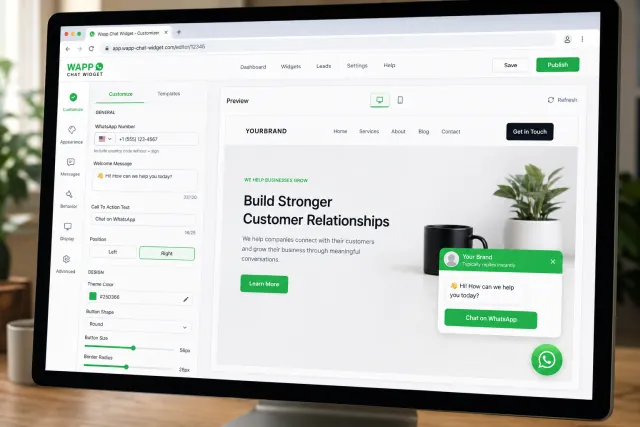
With Wapp Chat Widget, you can build different variations for different business goals.
Widget position
Place the widget in the bottom-right or bottom-left corner depending on your website layout. This helps avoid conflicts with cookie banners, sticky carts, accessibility buttons, or other floating UI elements.
Button shape and size
Use a compact chat bubble, a larger CTA button, or a more noticeable floating widget depending on how aggressive you want the contact point to be.
Colors and visual style
Keep the classic WhatsApp green or adapt the widget to your brand palette. For premium websites, this can make the widget look cleaner and less plugin-like.
Welcome message
Write a short, helpful message that matches the page intent. For example: "Have a question before ordering?" or "Need help choosing the right service?"
CTA text
Instead of a generic "Chat now," you can test more specific calls to action like "Message us on WhatsApp," "Ask a quick question," "Get a quote," or "Talk to support."
Avatar or brand identity
Add a logo, agent image, or brand element to make the widget feel more trustworthy.
Spacing and border radius
Small UI details matter. Rounded corners, padding, and spacing can make the widget feel either cheap or polished.
This level of control is especially useful for agencies, ecommerce brands, local service businesses, creators, consultants, and B2B companies that do not want their website to look like a template.
Use Ready-Made Templates or Build Your Own
Not every user wants to design a widget from scratch. Sometimes speed matters more than full control.
That is why ready-made templates are useful.
A template gives you a proven layout with sensible defaults: button position, greeting text, CTA, spacing, and a clean chat window. You only need to add your WhatsApp number, adjust the text, and copy the code.
Templates are perfect when you need to ship fast.
But if you want the widget to match a specific landing page, product page, or brand style guide, you can customize it manually. Change the colors, rewrite the message, adjust the button, and test different looks until it feels right.
This is the best of both worlds: start fast with a template and customize deeply when you need more control.
How to Generate a WhatsApp Widget with Wapp Chat Widget
1. Choose a widget template
Start with a layout that fits your website. For example, you can choose a minimal floating button, a branded chat panel, or a more conversion-focused widget with a welcome message.
2. Add your WhatsApp number
Enter the WhatsApp or WhatsApp Business number visitors should contact. Make sure to include the correct country code, especially if your business works with customers in the United States or internationally.
3. Write your welcome message
The welcome message should feel natural and useful. Avoid robotic text like "Hello user." A better version would be: "Hi! Have a question? Send us a message on WhatsApp."
4. Customize the design
Adjust the colors, position, button style, border radius, and CTA text. The goal is to make the widget visible enough to drive chats but not so aggressive that it hurts the UX.
5. Preview the widget
Check how the widget looks before publishing. Review both desktop and mobile behavior. A widget that looks great on desktop can feel too large on mobile if it is not configured properly.
6. Copy and install the code
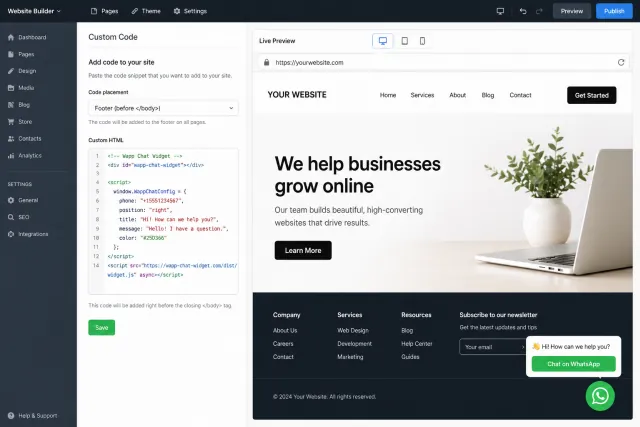
Once the widget is ready, copy the generated code snippet and paste it into your website. In most cases, you can add it through a custom HTML block, theme settings, tag manager, or website builder integration area.
That is it. No heavy dev work, no complicated setup, no custom JavaScript needed.
Simple Installation for Any Website
One of the biggest advantages of Wapp Chat Widget is simple installation.
You do not need to rebuild your website or install a complex live chat system. The generator gives you a lightweight installation code. You add it once, and the widget appears on your site.
Depending on your platform, you can usually install it through a custom HTML block, a website header or footer section, Google Tag Manager, a theme editor, a CMS template file, or a website builder embed block.
This makes it suitable for many types of websites, including landing pages, ecommerce stores, service websites, blogs, SaaS pages, portfolio sites, and local business websites.
For marketers, this is convenient because you can launch the widget without waiting for a long development sprint. For developers, it is clean because the setup is predictable and easy to control.
Best WhatsApp Widget Variations to Generate
Minimal floating WhatsApp button
Best for simple websites that only need a clear contact shortcut. It works well for local services, personal brands, consultants, and small business websites.
Branded chat panel
Best for websites where trust and presentation matter. The chat panel can include your business name, welcome message, and CTA button.
Sales-focused widget
Best for landing pages and ecommerce websites. The message can be written around conversion intent, such as "Need help before checkout?" or "Ask about availability."
Support widget
Best for SaaS, digital products, and service businesses. Use a support-oriented message like "Need help? Our team is available on WhatsApp."
Quote request widget
Best for contractors, agencies, clinics, real estate, and other lead-gen businesses. The CTA can push users toward a quote or consultation.
Mobile-first widget
Best for traffic-heavy mobile pages. The button should be easy to tap, not too large, and placed where it does not block key actions.
The best part is that you are not locked into one version. You can test different widget copy, design, and placement to see what drives more qualified conversations.
UX Tips for a Better WhatsApp Chat Widget
A WhatsApp widget should help the user, not interrupt them.
Keep the message short
A widget is not the place for a long pitch. One clear sentence is enough.
Make the CTA specific
"Chat on WhatsApp" is okay. "Get a quick quote" may work better on a service page.
Do not block important buttons
Check mobile pages carefully. The widget should not cover checkout buttons, sticky menus, cookie banners, or form submit buttons.
Use brand colors carefully
Classic WhatsApp green is recognizable, but a branded color can look more premium. Test both if design quality matters.
Match the page intent
A product page, pricing page, and contact page may need different widget copy.
Avoid spammy behavior
A widget that instantly opens, shakes, flashes, and covers the page can hurt trust. Keep it helpful and clean.
Think like a CRO specialist: every extra click, unclear CTA, or awkward placement can lower conversion. A good widget feels obvious, lightweight, and useful.
Who Should Use a WhatsApp Widget Generator?
A WhatsApp widget generator is useful for almost any business that wants more direct conversations from website traffic.
Ecommerce stores
Help users with product questions, sizing, shipping, returns, and checkout hesitation.
Local service businesses
Let visitors ask about pricing, availability, appointments, and service areas.
Real estate websites
Allow buyers, renters, and sellers to ask about listings instantly.
Agencies and consultants
Turn landing page visits into discovery calls or quick qualification chats.
Clinics and wellness businesses
Make appointment questions easier, while keeping the first step simple for the visitor.
Education and course websites
Answer questions about enrollment, schedules, pricing, and course fit.
SaaS and digital products
Offer a low-friction support or sales contact option for users who prefer messaging.
If your customers already use WhatsApp, adding a widget is a natural move. It makes your website feel more responsive and easier to contact.
Common Mistakes to Avoid
The biggest mistake is treating the widget as "just an icon." The design and message can directly affect how many people click it.
- Using a generic message on every page. A pricing page needs different copy than a blog article.
- Making the widget too intrusive. If it blocks content, users may close it or ignore it.
- Forgetting mobile UX. Most chat actions happen on mobile, so test the widget on a real phone.
- Using unclear CTA text. Tell people exactly what happens after they click.
- Not checking the phone number. A wrong country code or inactive number can kill the entire flow.
- Ignoring brand fit. A cheap-looking widget can reduce trust on a premium website.
With Wapp Chat Widget, most of these issues are easy to fix because you can preview and customize the widget before installation.
FAQ: WhatsApp Widget Generator
What is the best WhatsApp widget generator?
The best WhatsApp widget generator is one that lets you create a widget quickly, customize the design deeply, preview it before publishing, and install it without complex coding. Wapp Chat Widget is built around that workflow.
Can I create a WhatsApp widget without coding?
Yes. With Wapp Chat Widget, you can create the widget visually and copy the generated code. You do not need to write JavaScript manually.
Can I customize the WhatsApp widget design?
Yes. You can customize key design elements such as colors, button style, position, CTA text, welcome message, and overall widget appearance.
Can I use a ready-made template?
Yes. You can start with a popular template and adjust it for your website. This is useful when you want to launch quickly.
Can I match the widget to my website branding?
Yes. You can customize the widget so it fits your site's colors, tone, and layout instead of looking like a generic plugin.
Is the widget mobile-friendly?
Yes. A good WhatsApp widget should work smoothly on both desktop and mobile. Always preview the widget on mobile before publishing.
How do I install the widget on my website?
After generating the widget, copy the installation code and paste it into your website. You can usually add it through a custom HTML block, footer area, tag manager, or website builder embed section.
Does the widget work with WhatsApp Business?
Yes. You can connect the widget to your WhatsApp or WhatsApp Business number.
Generate Your WhatsApp Widget
A WhatsApp widget is one of the simplest ways to make your website more conversational. It gives visitors a direct line to your business, reduces friction, and turns passive browsing into real chats.
With Wapp Chat Widget, you can generate a widget in minutes, use ready-made templates, or customize every important detail to match your website design.
Create your widget, preview it, copy the code, and add WhatsApp chat to your website without the usual dev headache.