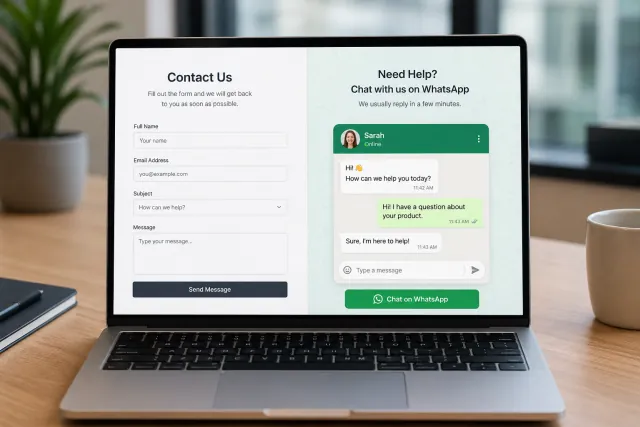
For years, the classic contact form was the default way to collect website leads. A visitor lands on your site, fills in a few fields, clicks submit, and waits for someone to reply by email.
That still works. But it is not always how modern customers want to talk.
A WhatsApp widget gives visitors a faster, more conversational way to contact your business. Instead of filling out a form and hoping for a response later, they click a floating WhatsApp button and start a real chat.
But this is not a "delete your contact form today" situation. A WhatsApp widget and a contact form solve different jobs. The smart move is often to use both.
Add a WhatsApp Widget Without Rebuilding Your Website
If you want to test WhatsApp as a website contact channel, you do not need to redesign your contact page or ask a developer to build a custom integration.
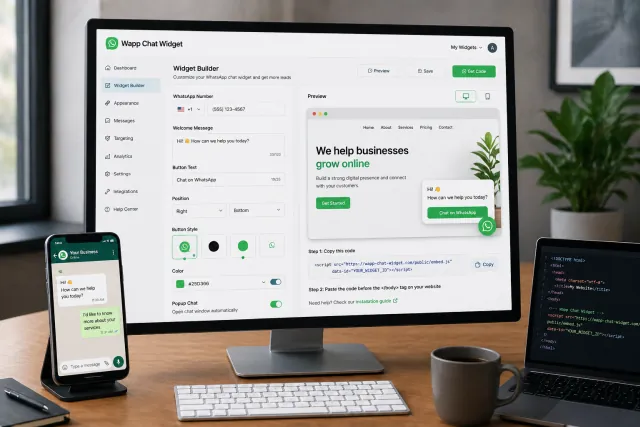
With Wapp Chat Widget, you can create a WhatsApp widget for your website, customize how it looks, and install it with a simple embed code. You can match the widget to your brand, choose the button style, set the greeting message, adjust the position, and create a smoother customer journey from page visit to conversation.
The main benefit is speed. You can go from "we should probably add WhatsApp to the site" to a live floating WhatsApp button in minutes. No heavy dev sprint, no complicated backend setup, no messy plugin stack.
Quick Comparison: WhatsApp Widget vs Contact Form
| Feature | WhatsApp Widget | Contact Form |
|---|---|---|
| Communication style | Real-time conversation | Structured message submission |
| Best for | Fast questions, sales chats, support, high-intent visitors | Detailed requests, quotes, applications, formal inquiries |
| User friction | Low: click and chat | Medium: fill fields and wait |
| Response expectation | Fast, conversational | Slower, email-based |
| Lead context | Built through conversation | Captured through form fields |
| Best strategy | Use for instant contact | Use for structured data |
Why WhatsApp Widgets Are Becoming Popular
The biggest reason is simple: people already use messaging apps every day. A WhatsApp chat widget turns your website from a static brochure into a direct conversation channel.
From a UX perspective, this matters. Every extra field in a form creates friction. Every delayed response creates drop-off. Every unclear next step hurts conversion intent.
A WhatsApp widget helps reduce that gap. The visitor sees a familiar icon, clicks it, and starts talking. It feels more natural than submitting a ticket or waiting for an email reply.
For bottom-funnel traffic - people on pricing pages, product pages, service pages, landing pages, or quote pages - this can be especially useful. These users are often already interested. They may only need one answer before they convert.
Benefits of a WhatsApp Widget
1. Lower Friction for Website Visitors
A WhatsApp widget removes the traditional "fill this out and wait" experience. Visitors can start with a quick message instead of completing multiple fields.
2. Faster Speed-to-Lead
In sales and support, speed-to-lead is not just a buzzword. It affects whether the customer talks to you or your competitor.
3. Better Mobile Experience
On mobile, long contact forms can feel clunky. WhatsApp is already built for mobile behavior. A visitor taps the widget and continues in an interface they already understand.
4. More Personal Communication
WhatsApp conversations feel less corporate than email. A short chat can qualify a lead faster than a cold form submission.
5. Easy Installation
With Wapp Chat Widget, installation is straightforward. You generate the widget, copy the code, and paste it into your website.
Downsides of a WhatsApp Widget
1. It Requires Fast Follow-Up
If you add WhatsApp to your website but nobody replies, the experience can backfire. A chat button creates an expectation of speed.
2. It Can Be Less Structured
A chat is flexible, but it can be messy. Contact forms force visitors to provide specific details. WhatsApp conversations may start with "Hi" and require your team to ask follow-up questions.
3. It May Not Fit Every Workflow
Some businesses need every inquiry to go into a CRM, ticketing system, legal process, or compliance workflow. A standard contact form can be easier to connect to those systems.
Why Contact Forms Still Matter
Contact forms are not dead. They are just not always the best first touch.
A contact form is still one of the most reliable ways to collect structured information from visitors. It works well when you need specific fields, routing, documentation, or a formal request.
- Full name and company name
- Business email
- Phone number
- Budget range
- Project timeline
- Service category
- File upload
- Consent checkbox
- CRM routing
- Department selection
The contact form is your structured intake channel. The WhatsApp widget is your fast conversation channel. Together, they cover more user preferences.
Benefits of a Contact Form
1. Better for Structured Lead Capture
Forms are great when you need clean, predictable data. Every submission follows the same format, which makes it easier to qualify leads, assign them to a team, or push them into a CRM.
2. Useful for Complex Requests
If a customer needs a detailed quote, technical support, partnership discussion, or custom service estimate, a form can collect the right information upfront.
3. Easier Internal Routing
Contact forms can send inquiries to different departments based on dropdown selections. Sales gets sales leads. Support gets support requests. HR gets job applications.
4. Good for Documentation
Some businesses need a written record before starting a conversation. Forms can help with compliance, internal review, and ticket creation.
Downsides of Contact Forms
1. More Friction
The more fields you add, the more drop-off you risk. A long form can feel like homework.
2. Slower Response Expectations
When someone submits a form, they usually expect to wait. That can be fine for non-urgent requests, but bad for high-intent prospects.
3. Email Inbox Problems
Many forms send leads to email. That creates a common problem: missed notifications, slow replies, or unclear ownership.
When to Use a WhatsApp Widget
Use a WhatsApp widget when speed and conversation matter.
- Local service businesses
- Ecommerce stores
- Travel and hospitality websites
- Real estate pages
- Clinics and appointment-based businesses
- Agencies and consultants
- SaaS landing pages
- Pricing pages
- Product pages
- High-intent paid traffic landing pages
When to Use a Contact Form
Use a contact form when the request needs structure.
- Quote requests
- Long B2B sales cycles
- Enterprise inquiries
- Support tickets
- Applications
- Legal or compliance-heavy communication
- File uploads
- Detailed project briefs
- CRM-based lead management
Best Practice: Use Both, But Give Each One a Job
The best website contact setup is not always "WhatsApp or form." It is usually "WhatsApp and form."
Use the WhatsApp widget for fast questions, pre-sales conversations, mobile visitors, urgent requests, and high-intent pages.
Use the contact form for detailed submissions, structured quotes, support tickets, and CRM workflows.
This gives visitors a choice. Some people want a quick chat. Others prefer a formal form. When you offer both, you do not force every visitor into the same funnel.

How to Install a WhatsApp Widget with Wapp Chat Widget
- Open the Wapp Chat Widget generator.
- Add your WhatsApp number.
- Customize the greeting, button style, colors, position, and behavior.
- Preview the widget.
- Copy the installation code.
- Paste it into your website.
- Publish the page and test the button on desktop and mobile.
You can keep your existing contact form and add WhatsApp as an additional conversion path. No need to rebuild your contact page from scratch.
Final Verdict: WhatsApp Widget vs Contact Form
A WhatsApp widget is better for fast, conversational, low-friction communication. A contact form is better for structured, formal, detailed information collection.
For most business websites, the strongest setup is both:
- WhatsApp widget for instant customer conversations
- Contact form for structured lead capture
- Clear routing so your team knows what to do next
- Fast follow-up so no inbound lead gets cold
If your website already has traffic but not enough conversations, adding a WhatsApp widget is one of the simplest tests you can run.
FAQ
Is a WhatsApp widget better than a contact form?
A WhatsApp widget is better for quick conversations and fast replies. A contact form is better for collecting structured information. Many websites should use both.
Should I remove my contact form after adding WhatsApp?
No. WhatsApp does not replace every use case for a contact form. Keep your form for detailed requests, quotes, support tickets, and CRM workflows.
Is a WhatsApp widget good for lead generation?
Yes, especially when visitors have quick questions before buying, booking, or requesting a quote. It can reduce friction and create a faster path to conversation.
Is a contact form still useful in 2026?
Yes. Contact forms are still useful for structured data collection, formal inquiries, and internal routing.
Can I install a WhatsApp widget without coding?
Yes. With Wapp Chat Widget, you can generate a widget, customize it, copy the embed code, and add it to your website.