If you add a WhatsApp widget to your website, the first instinct is usually simple: make it visible right away and let visitors click it whenever they want.
That sounds reasonable. But in practice, instant display is not always the best move.
A widget that appears the second the page loads can feel jumpy, distracting, or too eager — especially on landing pages, pricing pages, or mobile screens where every UI element already competes for attention. A delayed widget often performs better because it gives the visitor a second to orient themselves before the chat prompt enters the flow.
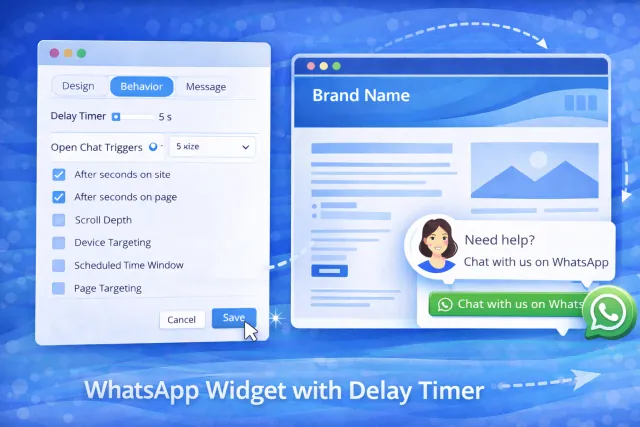
That is why more site owners are specifically looking for a whatsapp widget with delay timer instead of a generic floating button.
The delay itself is a small setting, but it changes the feel of the whole interaction. Instead of behaving like a popup that fires too early, the widget starts acting more like a smart trigger — something that appears when the visitor is more likely to be ready to engage.
What is a WhatsApp widget with delay timer?
A WhatsApp widget with delay timer is a website chat widget that waits a set number of seconds before appearing or opening on the page.
In other words, instead of showing the widget immediately on page load, you tell it to appear after a short delay — for example after 5, 8, or 10 seconds.
That can sound like a tiny UX tweak, but it often makes the widget feel:
- less aggressive;
- more contextual;
- less likely to interrupt the first screen view;
- more aligned with how people actually browse.
This is especially useful if you care about:
- cleaner mobile UX;
- reducing popup fatigue;
- improving engagement without hurting readability;
- making the widget feel intentional rather than intrusive.
And that is exactly where WApp Chat fits naturally.
If your goal is not just to add WhatsApp, but to control when it appears and how it behaves, this is the point in the article where the product becomes relevant. WApp Chat is not just a basic chat bubble generator — it is a builder-based setup where timing and behavior can be part of the experience instead of an afterthought.
Suggested image placement: wide rectangular image showing a builder panel with a delay timer / trigger settings on the left and a live WhatsApp widget preview on the right.
Why instant display is not always the best play
A lot of widgets underperform not because the channel is wrong, but because the timing is off.
If a visitor lands on the page and immediately gets hit with a floating chat prompt, the widget can feel like noise. On some sites it blends in nicely, but on others it competes with the hero section, sticky navigation, cookie banner, promo bar, and other above-the-fold elements.
That creates friction.
A delay timer solves that in a very simple way. It gives the page room to breathe first.
The visitor gets a few seconds to scan the content, understand the offer, and decide whether they want help. Then the widget appears at a moment that feels more natural. That often leads to better engagement because the chat prompt is not stealing attention before intent has had time to build.
In plain English: the widget stops acting like an interruption and starts acting like a nudge.
Why timing matters for conversions
Website conversations usually happen at the edge of intent.
Someone is reading your pricing page and has one quick question. Someone is on a service page and wants reassurance before contacting you. Someone is browsing on mobile and does not want to fill out a full form. Someone is deciding whether to bounce or ask.
That is the sweet spot for a WhatsApp widget.
But that moment usually does not happen at second zero.
It often happens a few seconds in — after the user has skimmed the headline, looked at the offer, or started processing whether your product or service is relevant. That is why timer-based display can be so effective: it lines the widget up more closely with real buying behavior.
Suggested image placement: wide rectangular image comparing instant popup versus delayed widget after 5 to 10 seconds, with the delayed version feeling cleaner and more user-friendly.
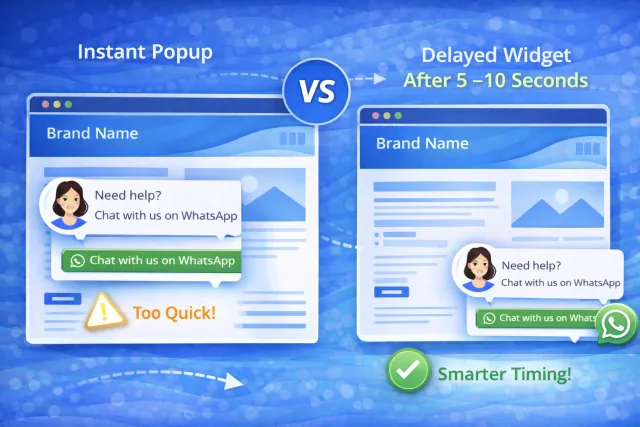
Delay timer is just the beginning
A good delay timer is useful on its own. But the real power comes when timing is part of a broader trigger system.
This is where a smarter WhatsApp widget starts to feel less like a static badge and more like a behavior-based conversion tool.
For this page, it makes sense to position WApp Chat not only as a widget with a delay timer, but as a widget that can work with a wider set of Open Chat Triggers and display rules — the kind of controls that help you tune the experience instead of blasting the same behavior sitewide.
That includes logic around things like:
- time on site;
- time on page;
- scroll depth;
- device targeting;
- scheduled time windows;
- specific pages or page groups;
- different launch conditions for different contexts.
In practice, that is what separates a generic floating button from a more refined setup. You are not just deciding whether the widget exists. You are deciding when it should enter the journey.
And that is a big deal on real sites, because the right trigger on the wrong page can still be a bad experience.
Best use cases for timer-based display
A delay timer works especially well on pages where visitors need a moment before they are likely to engage.
Some common examples:
- pricing pages;
- service detail pages;
- product pages;
- long-form landing pages;
- booking pages;
- comparison pages.
These are “money pages” where visitors often have intent, but not instantly. They need a little time to absorb the page.
On those pages, a timed widget often performs better than immediate display because it respects the natural reading flow. It lets users process first and interact second.
On the other hand, a widget shown too early can feel like a premature CTA.
How webmasters usually get this wrong
This part is worth calling out because timing is one of those things that looks simple until it is badly configured.
The usual mistakes are:
- showing the widget immediately on every page;
- using the same trigger logic sitewide;
- ignoring scroll behavior on long pages;
- letting the widget overlap with other sticky UI;
- not testing on mobile;
- assuming more visibility automatically means more conversions.
That last one trips up a lot of people.
More visibility is not always better. Better timing is better.
A delayed widget can often outperform an always-on one because it feels less spammy and more relevant. That matters for UX, and it matters for conversion friction too.
Why WApp Chat is a strong fit for this use case
If your main goal is a whatsapp widget with delay timer, WApp Chat is a strong fit because it is no-code, easy to install, customizable, and built to feel like part of the site rather than a clunky bolt-on element.
That matters because timing is rarely an isolated setting.
The people who care about delay timers usually also care about:
- how the widget looks;
- which pages it appears on;
- whether it behaves differently on mobile;
- what message is shown first;
- how pushy or relaxed the CTA feels.
WApp Chat is a practical fit for that kind of setup because it lets you treat the widget like part of the site experience, not just a bolt-on element.
Suggested image placement: wide rectangular image showing rules-based targeting — timer, scroll, device, page, and time-window settings — connected to one polished WhatsApp widget preview.
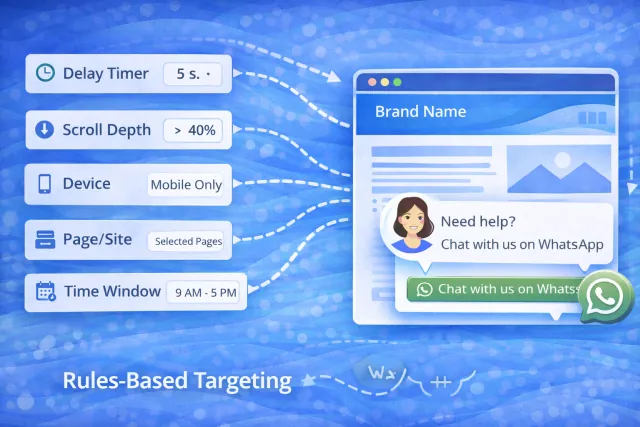
Final thoughts
A whatsapp widget with delay timer sounds like a narrow feature request, but it is really about something bigger: showing the widget at the right moment instead of the earliest possible moment.
That difference matters.
It affects how polished the site feels, how intrusive the widget feels, and whether the prompt helps the visitor or distracts them. For a lot of sites, especially mobile-first pages and high-intent landing pages, a small delay can be one of the easiest UX wins you make.
And when that delay is part of a broader trigger system — with rules around page targeting, device targeting, timing, and behavior — the widget becomes much more useful.
That is the right angle for WApp Chat. Not just “here is a floating WhatsApp icon,” but “here is a no-code widget you can tune to match how people actually browse.”
For webmasters, marketers, and business owners, that is usually the difference between a widget that merely exists and one that actually performs.
Frequently Asked Questions
What is a WhatsApp widget with delay timer?
It is a WhatsApp website widget that appears only after a set amount of time instead of showing immediately when the page loads.
Is a delay timer better than showing the widget instantly?
Often, yes. A short delay can make the widget feel less intrusive and more natural, especially on pricing pages, landing pages, and mobile screens.
What is a good delay for a WhatsApp widget?
A common starting point is around 5 to 10 seconds, then adjusting based on page type and visitor behavior.
Should I use the same widget timing on every page?
Usually not. High-intent pages, long-form pages, and mobile views often benefit from different timing and display rules.